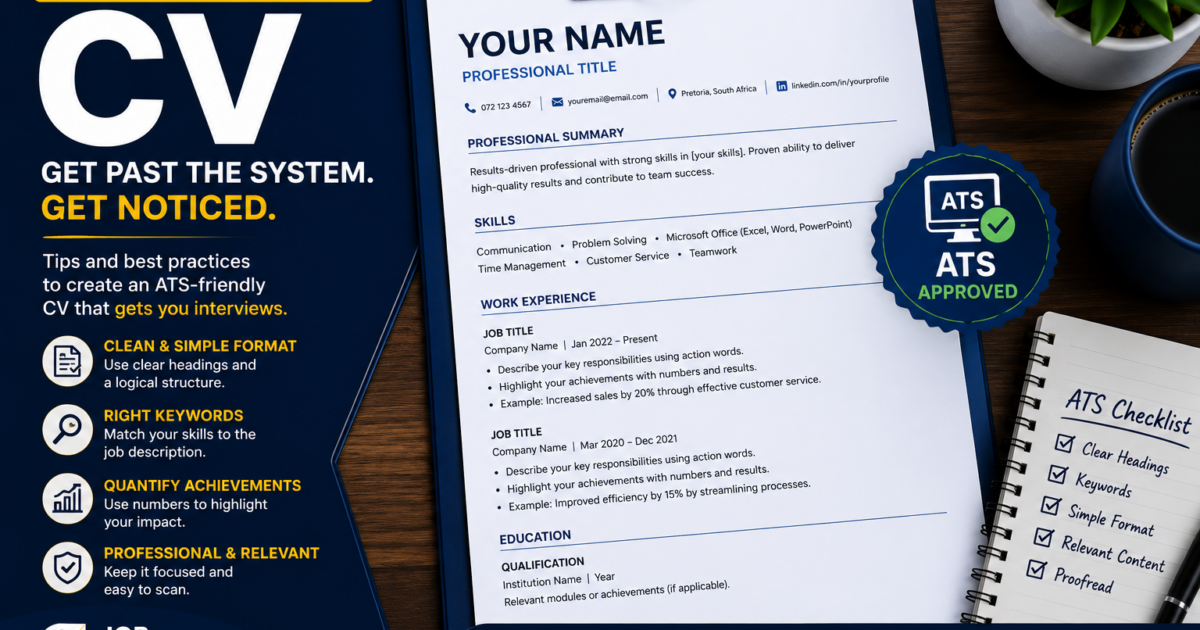
Larger employers and recruitment agencies often use software called an applicant tracking system (ATS) to receive and sort CVs. If your CV is badly formatted, the software may struggle to read it — and a human recruiter reading it in seconds will struggle too. The good news: making your CV easy for both to read is straightforward, and most of the scary advice out there is exaggerated. Here are the facts.
What an ATS actually is (and isn’t)
An ATS is software that helps employers collect, store and search CVs. When there are many applicants, recruiters may search for CVs containing certain words from the job description. It is a filing and search tool, not a robot that “rejects” you on its own — a person still makes the decisions. So your goal is simply to make sure your CV can be read and searched properly, and then read easily by the human who follows.
The best file format
A clean Word document (.docx) is the safest, most universally readable format across systems. A simple, text-based PDF also works with most modern systems. What does not work is a CV saved as an image — a scanned copy, a photograph of a printed CV, or a design exported as a picture — because the text cannot be read as text. Avoid those. When in doubt, .docx is the reliable choice; keep a tidy PDF for emailing directly to a person.
You may have heard that “PDFs are automatically rejected”. That is a myth — most current systems handle text-based PDFs fine. The real problem is image-based files, not PDFs as such.
Formatting that reads cleanly
- Use a simple layout with clear headings like “Work Experience”, “Education” and “Skills”.
- Stick to a standard, readable font.
- Avoid text boxes, columns, tables and headers/footers for important information — some systems scramble these.
- Keep graphics, logos and photos to a minimum, or leave them out.
- Use normal bullet points, not fancy symbols.
- Save the file with a sensible name, like “Name-Surname-CV”.
Use the right keywords (honestly)
Because recruiters and software search for words from the job description, your CV should include the relevant terms — as long as they are true for you. If the advert asks for “cash handling” and you have done it, make sure the phrase appears on your CV. This is exactly the tailoring process in tailoring your CV to a specific job, and it is why matching the advert’s language matters so much.
Don’t forget the human
After the software, a real person reads your CV — often quickly. Everything that helps the software (clean layout, clear headings, relevant keywords) also helps the human skim and understand your CV fast. A clear CV serves both audiences at once.
A quick self-check
Copy the text of your CV and paste it into a plain, empty document. If it comes out in a sensible order and nothing important disappears or scrambles, both software and recruiters can read it. If it turns into a jumble, your formatting is too complex — simplify it.
Common mistakes that make a CV hard to read
- Sending a scanned or photographed CV, or a design exported as an image.
- Using heavy graphics, columns, tables and text boxes.
- Putting your name or contact details only in the header or footer.
- Skill-rating bars and icons that software cannot interpret.
- Leaving out the relevant keywords from the job advert.
Exactly what tends to confuse screening software
- Tables and columns: text can be read in the wrong order or lost entirely.
- Text boxes: some systems skip their contents.
- Headers and footers: important details like your phone number can be missed if they live only there.
- Images and logos: any text inside them cannot be read.
- Unusual fonts and symbols: can come out garbled.
Keep your contact details and headings in the normal body of the document, in plain text, and you avoid all of this.
Keywords and human readability work together
The relevant words from the job advert help software find and rank your CV — but the same clear, well-organised CV also helps the recruiter who reads it next. You are never choosing between “pleasing the software” and “pleasing the person”: a clean, keyword-relevant, easy-to-scan CV does both at once. That is why tailoring (see tailoring your CV to the job) and clean formatting matter together.
Don’t overthink it
ATS advice can sound frightening, but the core is simple: a clean file, simple formatting, clear headings, and honest keywords from the advert. Do those, run the plain-text check, and your CV will get through the filter and land well with the human on the other side. You do not need tricks — you need clarity.
Do this now
Save your CV as a clean .docx, run the copy-and-paste plain-text check above, and confirm the relevant words from your target job advert appear naturally in the text.
Frequently asked questions
Should I send my CV as Word or PDF?
.docx is the safest all-round choice for online applications and systems. A simple text-based PDF is fine for emailing a person directly. Avoid image-based files.
Do all employers use an ATS?
No. Many smaller South African employers read CVs directly. But formatting your CV to be clean and readable helps in every case.
Will a designed, colourful CV hurt me?
It can, if the design breaks how software reads it. For most jobs, a clean, simple CV is the safer bet than a heavily designed one.
Is “ATS-friendly” just about keywords?
No — it is equally about clean formatting and a readable file. Keywords help, but only if the system can read your CV in the first place.
The bottom line
Making your CV ATS-friendly is not about tricks — it is about a clean file format, simple formatting, and the right honest keywords, all of which help the human reader too. Keep it clear and you get past the filter and impress the person on the other side. Once the interviews start, prepare with how to prepare for a job interview.